
TL;DR
- Goal: Split PDF files programmatically in Java (JDK 8+).
- Tool: Utilize the JPedal library.
- Process: Non-destructive splitting (into pages or chunks) using specific methods like
splitAllPages. - Outcome: New files are created, leaving the original PDF untouched.
Introduction
The PDF file format is not natively supported by Java. Therefore, to split a PDF file into multiple PDFs, you will need an external library. This tutorial explains how to split PDF files using JPedal. JPedal is the best Java PDF library for developers.
Use Cases
Why split a PDF in Java? Developers often encounter scenarios where large documents need to be segmented for easier processing. Common use cases include:
- Invoice Processing: Separating a bulk PDF into individual client invoices.
- Archiving: Breaking down large reports into chapter-based files.
- Security: Extracting non-sensitive pages from a confidential document to share publicly.”
Getting Started
- Add JPedal to your class or module path (download the trial jar)
- Create a File handle pointing to the PDF file
- Call one of the methods below from
PdfPageSplit, and supply a number to determine where to split the PDF
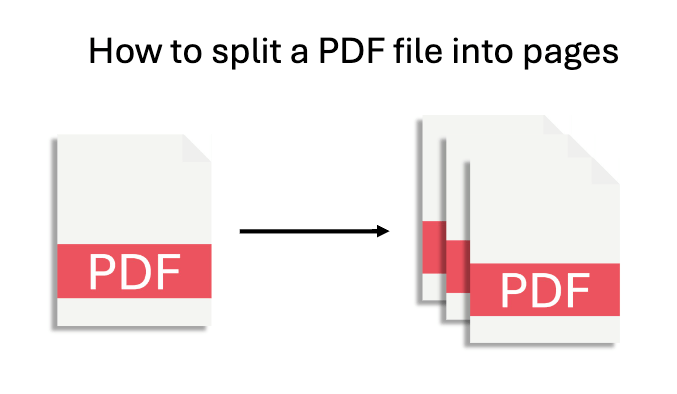
How to split a PDF file into pages
To split a PDF file into individual pages, simply call the following method.
PdfPageSplit.splitAllPages(new File("/path/to/input.pdf"), new File("/path/to/output-folder"));
How to split a PDF file into two files
To split a PDF file into two files, call the following method and provide the page number where you want to split. The first file will contain pages up to and including pageToSplitAt, and the second file will contain the rest.
PdfPageSplit.splitIn2(new File("/path/to/input.pdf"), new File("/path/to/output-folder"), pageToSplitAt);
How to split a PDF file into multiple files
To split a PDF file into multiple files, call the following method and provide the number of pages you want per file. Each file will contain pagePerNewFile number of pages, and the final file will contain the remainder.
PdfPageSplit.splitToNPagePDFs(new File("/path/to/input.pdf"), new File("/path/to/output-folder"), pagePerNewFile);
How to split a PDF file that is password protected
JPedal also supports PDF file splitting for password protected files. To do this, provide the password as the last parameter in any of the above methods.
PdfPageSplit.splitAllPages(new File("/path/to/input.pdf"), new File("/path/to/output-folder"), "password");
Before and after
Notice how the original file remains untouched

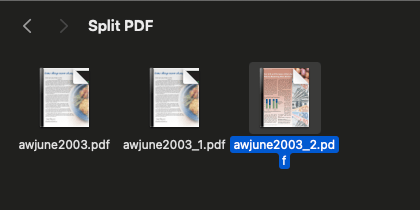
In this article I showed you how to break large PDF files into multiple documents still in the PDF format. Breaking a PDF into multiple files will have many advantages such as being able to focus on specific content and helping with file size management.
FAQs
Q: Does splitting a PDF affect the quality of the pages?
A: No. When using JPedal, the pages are extracted as-is. The vector graphics, images, and text resolution remain identical to the original source.
Q: How do I handle large PDF files efficiently?
A: For very large files, ensure your JVM has sufficient heap memory allocated. JPedal is optimized to handle large documents by streaming content where possible.
Q: Can I split a PDF in Java without an external library?
A: It is technically possible but highly complex to write a raw PDF parser from scratch. Using a dedicated library like JPedal, Apache PDFBox, or iText is standard practice to handle compression, encryption, and cross-reference tables correctly.
The JPedal PDF library allows you to solve these problems in Java
//Convenience static method (see class for additional options)
ExtractClippedImages.writeAllClippedImagesToDir("inputFileOrDirectory", "outputDir", "outputImageFormat", new String[] {"imageHeightAsFloat", "subDirectoryForHeight"});
final PdfManipulator pdf = new PdfManipulator();
pdf.loadDocument(new File("inputFile.pdf"));
pdf.addPage(1, PaperSize.A4_LANDSCAPE);
pdf.addText(1, "Hello World", 10, 10, BaseFont.HelveticaBold, 12, 1, 0.3f, 0.2f);
pdf.addImage(1, new BufferedImage(), new float[] {0, 0, 100, 100});
pdf.rotatePage(1, 90);
pdf.apply();
pdf.writeDocument(new File("outputFile.pdf"));
Viewer viewer = new Viewer();
viewer.setupViewer();
viewer.executeCommand(ViewerCommands.OPENFILE, "pdfFile.pdf");
//Convenience static method (see class for additional options)
ExtractTextAsWordList.writeAllWordlistsToDir("inputFileOrDirectory", "outputDir", -1);
PdfMerge.mergeFiles(new File("inputFile1.pdf"), new File("inputFile2.pdf"), new File("outputFile.pdf"));

PdfManipulator.splitInHalf(new File("inputFile.pdf"), new File("outputFolder"), pageToSplitAt);
PrintPdfPages print = new PrintPdfPages("C:/pdfs/mypdf.pdf");
if (print.openPDFFile()) {
print.printAllPages("Printer Name");
}//Convenience static method (see class for additional options)
ExtractClippedImages.writeAllClippedImagesToDir("inputFileOrDirectory", "outputDir", "outputImageFormat", new String[] {"imageHeightAsFloat", "subDirectoryForHeight"});
//Convenience static method (see class for additional options)
ArrayList resultsForPages = FindTextInRectangle.findTextOnAllPages("/path/to/file.pdf", "textToFind");
java -jar jpedal.jar --inspect "inputFile.pdf"PdfSigner.signPdf(
"inputFile.pdf",
"outputFile.pdf",
"keystorePassword",
"keystoreFile.p12",
"signerName",
"signerLocation",
"signingReason",
ACCESS_PERMISSION.P1
);What is JPedal?
JPedal is a commercial Java PDF Library that makes it easy for Java developers to work with PDF Documents in Java.
Why use JPedal?
JPedal makes it much easier to work with PDF files from Java. Because we have been actively developing our Java PDF Toolkit for over 20 years, it works with all those problem PDF files out there.
What licenses are available?
We have 2 licenses available:
'Server' for on premises and cloud servers and 'OEM' for use in a named end user applications. Both are one time fees with options support renewal after 12 months.
How to use JPedal?
Want to learn more about JPedal and how to use it, we have plenty of tutorials and guides to help you.