
The PDF file format is not natively supported by Java. Therefore, to remove a page from a PDF file, you will need an external library. This tutorial explains how to do this using JPedal. JPedal is the best Java PDF library for developers.
Getting Started
- Add JPedal to your class or module path (download the trial jar)
- Create a File handle pointing to the PDF file
- Call one of the methods below from
PdfManipulator
How to remove a single page from a PDF
To remove a single page from a PDF file, simply run the following code.
final PdfManipulator pdf = new PdfManipulator();
pdf.loadDocument(new File("/path/to/input.pdf"));
pdf.removePage(pageNumber);
pdf.apply();
pdf.reset();
pdf.writeDocument(new File("/path/to/output.pdf"));
pdf.closeDocument();
How to remove multiple pages in a custom range
To remove a pages in multiple different ranges, simply call the following method. The page range must be defined using SetOfIntegerSyntax
final PdfManipulator pdf = new PdfManipulator();
pdf.loadDocument(new File("/path/to/input.pdf"));
pdf.removePage(new PageRanges("1-10"));
pdf.apply();
pdf.reset();
pdf.writeDocument(new File("/path/to/output.pdf"));
pdf.closeDocument();
How to remove pages using the command line
JPedal also allows you to remove pages from a PDF file through the command line
java -cp jpedal.jar org.jpedal.manipulator.PdfManipulator --removePage inputFile outputFile "2-100"
Before and After
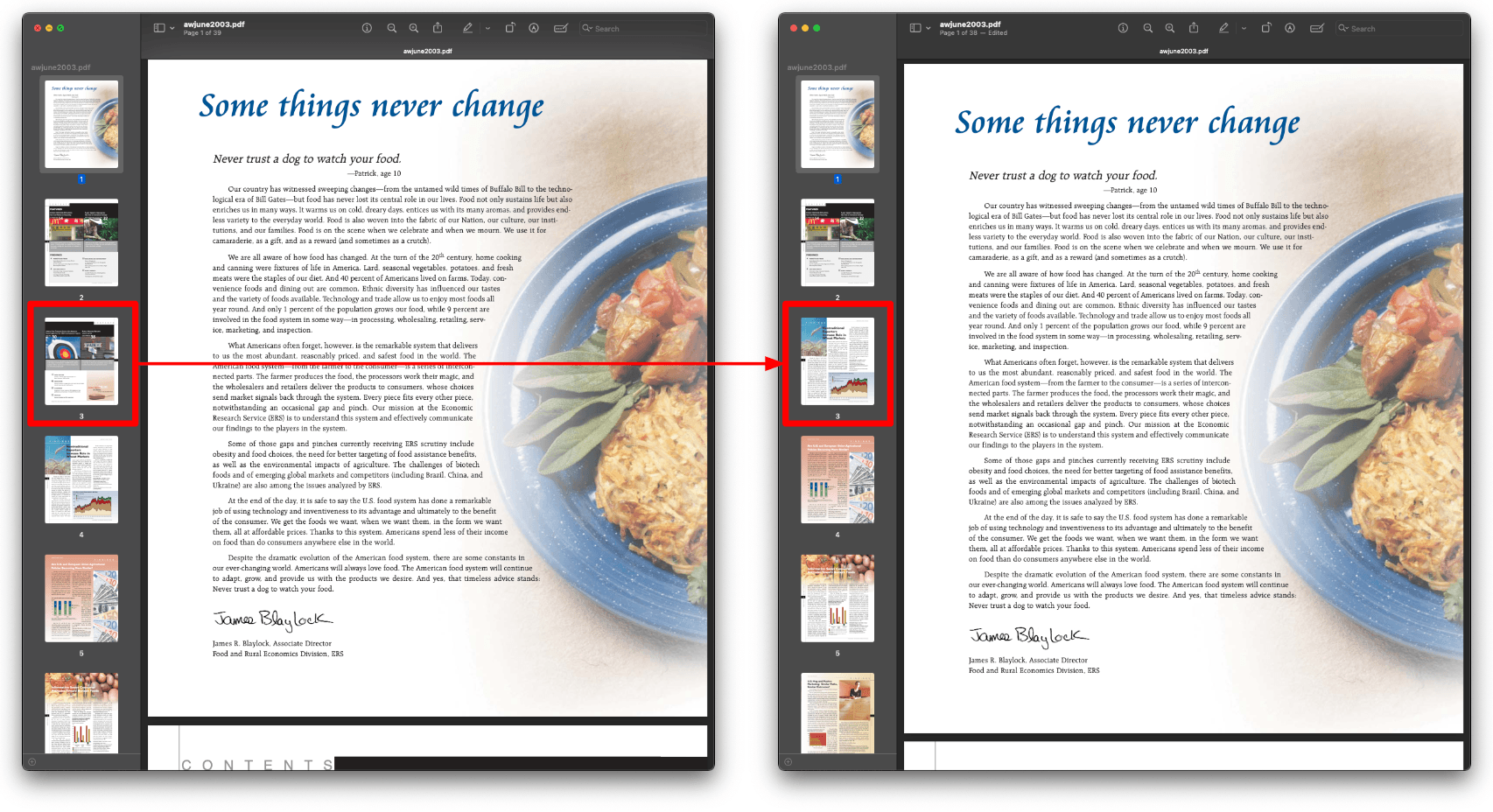
The JPedal PDF library allows you to solve these problems in Java
ConvertPagesToImages.writeAllPagesAsImagesToDir("inputFileOrDir", "outputDir", "bmp", 1.33f);PdfA3Converter converter = new PdfA3Converter(PdfA3Converter.Level.B);
PdfA3Converter.ConversionResult result = converter.convert(new File("inputFile.pdf"), new File("outputFile.pdf"));
if (result.issues().isEmpty()) {
// If no issues reported then file converted successfully
// A list of changes to the file are also reported
Set<String> changes = result.changes();
System.out.println("Success!");
} else {
// File was not able to convert
System.out.println("Failure");
}final PdfManipulator pdf = new PdfManipulator();
pdf.loadDocument(new File("inputFile.pdf"));
pdf.writeDocument(new File("outputFile.pdf"), "encryptionPassword".getBytes());
pdf.closeDocument();// Extract text
ExtractTextAsWordList.writeAllWordlistsToDir("inputFileOrDirectory", "outputDir", -1);
// Extract images
ExtractClippedImages.writeAllClippedImagesToDir("inputFileOrDirectory", "outputDir", "outputImageFormat", new String[] {"imageHeightAsFloat", "subDirectoryForHeight"});
// Extract metadata
final PdfUtilities utilities = new PdfUtilities("path/to/exampleFile.pdf");
try {
if (utilities.openPDFFile()) {
// Returns a String containing all metadata fields for the document
final String documentPropertiesAsXML = utilities.getDocumentPropertyFieldsInXML();
// Returns the total page count as an int
final int totalPageCount = utilities.getPageCount();
for (int i = 1; i != totalPageCount; i++) {
// Get the page dimensions for the specified page in the given units and type
final float[] pageDimensions = utilities.getPageDimensions(i, PdfUtilities.PageUnits.Pixels, PdfUtilities.PageSizeType.CropBox);
// Returns the image data as a String for the specified page
final String xImageDataForPage = utilities.getXImageDataForPage(i);
}
}
} catch (final PdfException e) {
e.printStackTrace();
}
utilities.closePDFfile();java -jar launcher.jarViewer viewer = new Viewer();
viewer.setupViewer();
viewer.executeCommand(ViewerCommands.OPENFILE, "inputFile.pdf");final PdfManipulator pdf = new PdfManipulator();
pdf.loadDocument(new File("inputFile.pdf"));
pdf.addPage(1, PaperSize.A4_LANDSCAPE);
pdf.addText(1, "Hello World", 10, 10, BaseFont.HelveticaBold, 12, 1, 0.3f, 0.2f);
pdf.addImage(1, new BufferedImage(), new float[] {0, 0, 100, 100});
pdf.rotatePage(1, 90);
pdf.apply();
pdf.writeDocument(new File("outputFile.pdf"));PrintPdfPages print = new PrintPdfPages("inputFile.pdf");
if (print.openPDFFile()) {
print.printAllPages("Printer Name");
}ArrayList<Float[]> resultsForPages = FindTextInRectangle.findTextOnAllPages("/path/to/file.pdf", "textToFind");What is JPedal?
JPedal is a commercial Java PDF Library that makes it easy for Java developers to work with PDF Documents in Java.
Why use JPedal?
JPedal makes it much easier to work with PDF files from Java. Because we have been actively developing our Java PDF Toolkit for over 20 years, it works with all those problem PDF files out there.
What licenses are available?
We have 2 licenses available:
'Server' for on premises and cloud servers and 'OEM' for use in a named end user applications. Both are one time fees with options support renewal after 12 months.
How to use JPedal?
Want to learn more about JPedal and how to use it, we have plenty of tutorials and guides to help you.
