
TL;DR HEIF is a container format for images, standardised by MPEG as ISO/IEC 23008-12. HEIC is a HEIF file whose pictures were compressed with HEVC, which is what an iPhone produces. A HEIC file is one kind of HEIF file, and the kind most people meet. The distinction is why Windows offers you two separate Microsoft Store packages, and why a decoder that opens one of these files may refuse the next one.
Contents:
- What HEIF is
- What is inside a HEIF file
- HEIF vs HEIC
- .heif, .heic, .hif: which extension you get
- HEIF vs JPEG
- HEIF Image Extensions on Windows
- Where HEIF works today
- Reading HEIF and HEIC in Java
- Frequently asked questions
What HEIF is
HEIF stands for High Efficiency Image File Format. MPEG settled the design in 2015 and it was published as ISO/IEC 23008-12, part of the same MPEG-H family as the HEVC video codec.
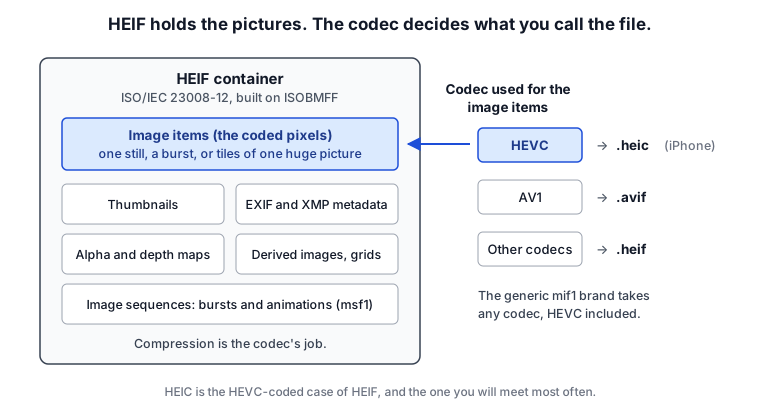
HEIF compresses nothing itself. It is a wrapper built on the ISO base media file format (ISO/IEC 14496-12), the same structure MP4 uses for video, adapted to hold still pictures and the things that belong with them. Pixel compression is delegated to a codec, and the spec is deliberately vague about which one.
That design is why a file extension can’t tell you whether your software will open the file. It depends on which codec compressed the image items inside.
What is inside a HEIF file
A JPEG holds one picture and some metadata appended to it. A HEIF file holds a set of numbered items, any of which can be a picture, and a set of relationships between them.
In practice that gets you:
- A burst, an animation, a set of bracketed exposures: all of it goes in as several pictures in one file, no side-car convention required.
- A large photo can be stored as a grid of small coded tiles, with an item saying how to reassemble them. That grid is a derived image, an item built out of other items, and overlays work the same way. Rotation and cropping are item properties instead (
irot,imir,clap), applied by the decoder on the way out. - Auxiliary channels such as alpha and depth maps are attached to the picture they belong to. That is how portrait-mode blur survives a trip through a photo app.
- EXIF and XMP are first-class metadata items, stored in the file the same way the pictures are.
- Thumbnails are declared as such, so a file browser doesn’t decode a 48-megapixel image to draw a 200-pixel preview.
Live Photos are the thing people expect to find in that list. An iPhone writes those as a HEIC still and a separate .mov, so the sequence support in HEIF is doing none of the work there.
Each file declares a brand, a four-character code that tells a decoder what it is dealing with: avif for AV1, heic and heix for HEVC-coded stills, mif1 for generic HEIF, msf1 for sequences.
HEIF vs HEIC
HEIC stands for High Efficiency Image Container, and it is the name given to a HEIF file whose image items were coded with HEVC (H.265).
JPEG works the same way. A .jpg file is a JFIF or Exif wrapper around JPEG-coded data, in the way a .heic file is a HEIF wrapper around HEVC-coded data. The wrapper stays invisible there because every JPEG decoder reads both of them. HEIF libraries advertise support per codec, so both names turn up in release notes and dependency lists and you have to know which one you are getting.
Apple adopted it in iOS 11 in 2017, which is why “HEIF vs HEIC” is a question at all. For most people the two words point at the same thing, because the only HEIF files they have ever received are the HEIC photos an iPhone produced. Software that handles one of these can still fail on the other:
- A viewer that lists HEIF support can still choke on your photos. It reads the container and has no HEVC decoder.
- AVIF uses the same container structure with AV1 instead of HEVC. Chrome displays AVIF and won’t touch HEIC, even though both files are built the same way.
- HEVC comes with patent pools and licence fees. AV1 is royalty-free. The support gaps you run into usually trace back to that.
.heif, .heic, .hif: which extension you get
- .heic comes off iPhones and iPads, and the pictures inside are always HEVC-coded.
- .heif turns up when the software that wrote the file picked the generic name. It can hold HEVC, AVC, even JPEG-coded items.
- .hif is what Canon, Fujifilm and Sony call their 10-bit HDR stills. It is the same format with a different extension on it.
All three can contain exactly the same data, so a decoder reads the brand and the item properties before it trusts the filename.
HEIF vs JPEG
The headline claim is that a HEIC photo is about half the size of the equivalent JPEG at the same visual quality. In normal shooting conditions it holds up: HEVC’s intra-frame prediction is doing work that JPEG’s 1992-vintage DCT blocks can’t.
The feature list is wider too:
| JPEG | HEIF/HEIC | |
|---|---|---|
| Colour depth | 8-bit | 10-bit and above, codec permitting |
| Images per file | one | many, with relationships between them |
| Lossless mode | rarely implemented | supported |
| Opens everywhere | yes | no |
| Transparency | none | alpha channel |
Compatibility is why JPEG is still the safe choice for anything leaving your hands. Anything written in the last thirty years can read one, and nobody has to install a package or pay a licence fee to look at it.
HEIF Image Extensions on Windows
Windows doesn’t ship a HEIF decoder. The Microsoft Store has a free HEIF Image Extensions package that teaches Photos and File Explorer the container, which covers HEIF files coded with something Windows already understands.
iPhone photos are HEVC-coded, so Windows also wants HEVC Video Extensions. That one costs around $0.99, for the licensing reasons above. Some PC manufacturers pre-license it, in which case a free “from Device Manufacturer” listing will install on your machine, so check for that before you pay. If it’s a handful of photos, converting them to JPEG is faster than any of this, and our guide to converting HEIC to JPG in bulk covers doing a whole folder at once.
For opening these files on macOS, Android, Linux, Photoshop or GIMP, what is HEIC goes through each one.
Where HEIF works today
Apple platforms read and write HEIC throughout. Android has decoded HEIF since Android 9, and devices from Android 10 can capture it where the hardware encoder supports it. Windows needs the Store packages above. Safari displays HEIC in a web page. Chrome and Firefox don’t, and you get a broken image icon.
On the server the problem is harder to dodge, because phones upload HEIC whether or not anyone planned for it, and a stack built around JPEG and PNG has to decide between decoding the format and rejecting the upload.
Reading HEIF and HEIC in Java
Java’s ImageIO covers BMP, GIF, JPEG, PNG and TIFF. HEIF isn’t on that list and never has been, so ImageIO.read() returns null on a HEIC file and leaves you to work out why. TwelveMonkeys adds a long list of formats to ImageIO, and HEIF is one of the few it leaves out.
The usual options are:
- Calling libheif through JNI or JNA is the mature route. You are shipping a native library with your application after that, and a segfault in it takes the JVM down with it.
- Nokia’s HEIF library is C++ with Java bindings, and it parses the container only. You supply the HEVC decoder yourself, and the licence covers evaluation, testing and academic research, so it is out for anything commercial.
- You can shell out to ImageMagick or libvips. That works on a workstation, and gets awkward once you are inside a container or a servlet.
- Our own commercial library, JDeli, decodes HEIC in pure Java with no native binaries, writes it, converts straight to JPEG with the EXIF carried across, and registers as an
ImageIOplugin so existingImageIO.read()calls start working.
The JDeli tutorials cover reading HEIC files in Java, writing HEIC image files and adding HEIC support to an existing app, and the HEIC documentation lists the API in full.
Frequently asked questions
Does converting HEIC to JPG lose quality?
Yes. The HEIC is decoded and re-encoded as JPEG, so you take a generation of loss, and anything JPEG can’t hold goes with it: the 10-bit colour, the alpha channel, the depth map, the other pictures in a burst. Keep the originals if the photos matter.
Why do my iPhone photos arrive as JPEG when I email them?
iOS converts on the way out when the destination hasn’t advertised HEIC support, which covers most email and upload paths. The file on the phone is still HEIC. That’s also why the same photo can reach one person as a .jpg and another, over AirDrop to a Mac, as a .heic.
Do HEIC files still carry location data?
Yes. GPS coordinates live in the EXIF block like they do in a JPEG, and a decent converter carries that across to the output file. If you are publishing the photos, strip the metadata yourself and check the output before it goes up.
Is HEIF always lossy?
No, the spec allows lossless coding. In practice, the HEIC files a phone or camera writes are lossy, because the point of the format was to halve the size of the JPEG it replaced.
We have been building PDF and image software for over 25 years, and our image format guides cover the rest of them.