
TL;DR A HEIC photo takes about half the space of the same picture as a JPEG, and it can carry things JPEG has nowhere to put. Most software still won’t open it. JPEG is older and 8-bit and bigger on disk, and it works everywhere without anyone paying a licence fee to decode it.
Keep HEIC for photos that stay on your own devices and send JPEG to everyone else. Java’s ImageIO reads JPEG and returns null on a HEIC.
Contents:
- HEIC vs JPEG at a glance
- Where the two formats come from
- Why a HEIC file is smaller
- Where the “half the size” figure comes from
- Quality and colour depth
- What HEIC holds that JPEG can’t
- What JPEG still does better
- Where each one opens
- HEVC patents and the compatibility gap
- What you lose converting HEIC to JPEG
- HEIC in code, and why it goes wrong
- Reading and writing HEIC in Java
- Which should you use?
- Frequently asked questions
HEIC vs JPEG at a glance
The table compares the two formats on the points the rest of this post covers in detail.
| JPEG | HEIC | |
|---|---|---|
| Standardised | 1992 | Finalised 2015 |
| Container | JFIF or Exif | HEIF built on ISOBMFF |
| Codec | JPEG’s DCT | HEVC (H.265) |
| Size of the same photo | Baseline | Roughly half |
| Colour depth | 8-bit | 8-bit from an iPhone; 10-bit from some cameras |
| Transparency | None | Alpha as an auxiliary item |
| Pictures per file | One | Many |
| Lossless mode | In the spec; used inside DNG raw and DICOM medical images | In the spec; phones don’t write it |
| Progressive loading | Yes | No |
| Opens everywhere | Yes | No |
| Patents | Expired | HEVC patents apply |
Java ImageIO support |
Yes | No |
Where the two formats come from
A .jpg is a JFIF or Exif wrapper around pixels compressed with the JPEG algorithm. It holds one picture and whatever metadata got appended to it. The design dates from 1992 and has barely moved since.
A .heic is a HEIF container holding pictures compressed with HEVC, the video codec. That split between container and codec causes most of the trouble people have with these files. HEIF is an ISO standard for the container alone and compresses nothing itself.
Swap HEVC for AV1 inside the same container and the file becomes an AVIF. Swap in AVC, or JPEG itself, and it’s still a valid HEIF under the generic mif1 brand.
Why a HEIC file is smaller
JPEG cuts a picture into a fixed grid of 8×8 blocks and codes every one of them the same way. The DC value, the block’s average brightness, is stored as a difference from the block before it. Beyond that no block knows anything about its neighbours, so a patch of empty sky goes through exactly the same steps as a patch of hedge.
HEVC sizes its coding units to the content instead, anywhere from 64×64 down to 8×8. Flat sky becomes one large unit where JPEG would have spent sixty-four small ones. Detail along an edge gets units small enough to describe it.
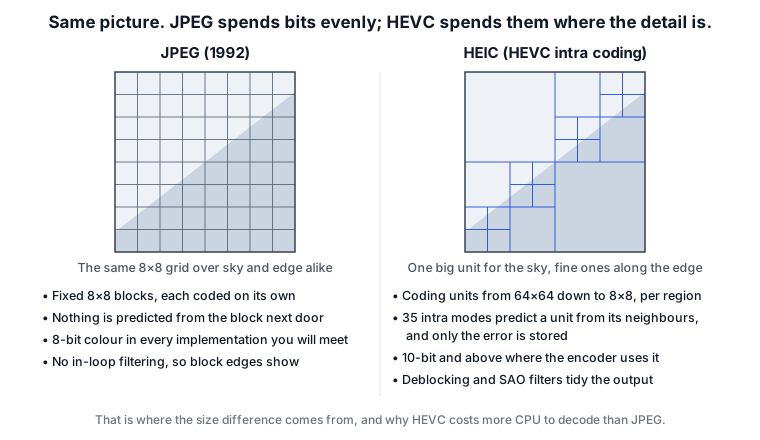
Before coding a unit, HEVC guesses what’s in it from the pixels already decoded above and to the left, and stores only the difference between that guess and the truth. It has 35 intra prediction modes to pick from: planar, DC and 33 directional ones. JPEG has no equivalent step. In smooth regions such as sky or skin the difference is close to nothing, so there’s very little left to store.
A deblocking filter and sample adaptive offset then run over the decoded result. Both are built into the codec, so every decoder applies them, and they’re why heavy HEIC compression goes soft and smeary where a JPEG goes blocky.
All of this costs far more CPU to decode than a JPEG does, which you won’t notice on a phone with dedicated silicon and will notice on a server taking photo uploads.
Where the “half the size” figure comes from
HEIC is usually quoted at about 50% smaller. The figure traces back to Apple’s WWDC 2017 session on HEIF, so it’s a vendor’s claim about its own encoder.
It also moves around a lot. Flat skies and skin compress beautifully. Film grain, foliage and sensor noise all hold HEVC’s prediction back, and on that sort of content the gap narrows a long way.
The JPEG encoder matters as well. A modern one such as jpegli gets noticeably more out of the same format. Watch which test is being quoted, too. “Same quality at half the size” and “better quality at the same size” are different measurements, and the first gives the bigger number.
Quality and colour depth
At a given file size a HEIC holds detail better than a JPEG, and its artefacts are less objectionable when you push the compression hard.
An iPhone’s HEIC files are 8-bit. Apple uses HEVC’s Main profile at 8 bits per channel, and the HDR gain map an iPhone 12 or later writes alongside the picture is 8-bit as well. Ten-bit stills do exist, on the Canon, Sony and Fujifilm bodies that write .hif files. If a workflow depends on the extra depth, check a real file first with an open-source metadata reader such as ExifTool, which reports the bit depth.
“16-bit HEIC” turns up in forum posts as well, and that one mixes up bits per channel with bits per pixel. JPEG’s 8 bits per channel is 24 bits per pixel, the familiar 16 million colours.
The HEIC a phone writes is lossy. The non-destructive editing people credit to the format belongs to iOS Photos: the library keeps your original and stores the adjustments beside it, so a HEIC copied out of the library arrives with its edits already applied.
What HEIC holds that JPEG can’t
The container was built to hold more than a single picture, so a .heic has slots for things a .jpg has nowhere to put:
- A burst, a bracketed set or an animation goes in as several pictures in one file, where JPEG holds exactly one.
- An alpha channel is stored as an auxiliary image attached to the picture it belongs to, and the same mechanism carries depth maps, which is how portrait-mode blur survives a trip through a photo app.
- A huge photograph can be stored as a grid of small coded tiles with an item describing how to reassemble them, so a viewer can decode part of it.
- Thumbnails are declared as such, so a file browser doesn’t decode 48 megapixels to draw a 200-pixel preview.
- Rotation and cropping are item properties, so nothing has to be re-encoded.
- EXIF and XMP are first-class items, stored in the container the same way the pictures are.
What JPEG still does better
Anything built in the last thirty years reads a JPEG, with nothing to install and no fallback to write.
A progressive JPEG shows a rough version of the whole picture from the first few kilobytes. HEIC has no equivalent, which is one of the reasons it never became a web delivery format.
You also know what you’re getting with a JPEG. Two HEIC files can differ in bit depth and in how many pictures they hold, and the picture itself might be a single item or a grid of tiles you have to reassemble first.
Print labs, upload forms and internal APIs take JPEG and refuse a .heic.
Where each one opens
Apple platforms read and write HEIC throughout iOS, iPadOS and macOS. Android has decoded HEIF since Android 9, and devices from Android 10 can capture it where the hardware encoder allows.
Windows ships no decoder at all. The Microsoft Store has a free HEIF Image Extensions package for the container. iPhone photos are HEVC-coded, so you need HEVC Video Extensions as well, at around $0.99.
Safari displays a HEIC in a web page. Chrome, Firefox and Edge show a broken image icon, so serving HEIC to the web means a <picture> fallback for almost every visitor.
Linux, Photoshop and GIMP vary. It’s a plugin or a libheif-backed package away on most of them, and each platform has its own route in. Upload forms, print kiosks, older editing software and anything validating file types against a fixed list will reject it outright.
HEVC patents and the compatibility gap
HEVC is covered by patents, licensed through patent pools and by individual patent holders. Chrome and Firefox play HEVC video using the hardware or operating system decoder, but neither bundles a software decoder and neither displays a HEIC in an <img> tag. Microsoft charges 99 cents for the HEVC extension on Windows.
For how this applies to our own library, see Does JDeli need HEVC patents?
JPEG’s patents expired a long time ago.
AV1 is royalty-free, and AVIF got the browser support HEIC never did, even though the two share a container. Use AVIF on the open web. Java can’t read AVIF on its own, but with a library added you can read it on the server too.
What you lose converting HEIC to JPEG
Converting to JPEG costs you:
- A generation of compression loss, because the HEIC is decoded and re-encoded.
- Any extra pictures, so a burst collapses to a single frame.
- The alpha channel, the depth map, and 10-bit colour where it was there to begin with. A JPEG can’t hold any of them.
- EXIF and GPS, if the converter drops them, and plenty do.
Keep the originals if the photographs matter. You can also bulk convert HEIC to JPG.
HEIC in code, and why it goes wrong
HEIC varies far more than JPEG does, and the tooling around it doesn’t warn you when you’ve guessed wrong.
ImageIO covers BMP, GIF, JPEG, PNG and TIFF. It has never covered HEIF, and it fails quietly, returning null with nothing thrown and nothing logged to explain it:
BufferedImage image = ImageIO.read(new File("IMG_0423.heic"));
TwelveMonkeys adds a long list of formats to ImageIO, and HEIF is one of the few it leaves out.
The extension and the MIME type can’t be trusted either. Browsers and mobile clients regularly upload HEIC as application/octet-stream, and .heic, .heif and .hif can all contain the same thing.
What you want is the ftyp box at offset 4 and the brand that follows it, one of heic, heix, mif1 or msf1. Go by the extension and you reject a camera’s perfectly valid .hif.
Picking the right picture out of the file is a separate problem. A HEIC holds numbered items, and the pitm box names the one you want. Code that grabs the first image item gets a thumbnail, a depth map or the second frame of a burst, depending on who wrote the file.
A large picture is often a grid derived item assembled from tiles, so code that returns the first tile returns a corner of the photograph. iPhones write every photo this way, in 512×512 tiles.
Rotation and mirroring sit in the irot and imir item properties, and a decoder has to apply them. A 10-bit picture has to be reduced on the way into a standard BufferedImage, and a careless reduction puts banding into the gradients.
libheif through JNI or JNA is the mature route out of all this. You ship platform-specific binaries with your application afterwards, and a segfault inside one takes the JVM with it.
Nokia’s HEIF library parses the container only and leaves the HEVC decoder to you; its licence covers evaluation and research, not commercial work. Calling out to ImageMagick or libvips as a subprocess works on a workstation and gets awkward inside a container, a servlet or a locked-down build.
Reading and writing HEIC in Java
Our own commercial library, JDeli, handles HEIC in pure Java. There are no native binaries to ship.
BufferedImage image = JDeli.read(new File("IMG_0423.heic"));

JDeli.write(image, "heic", new File("output.heic"));

JDeli.convert(new File("IMG_0423.heic"), new File("output.jpg"));
The three calls read a HEIC, write one back out and convert straight through with the EXIF carried across. JDeli ships as an ImageIO plugin as well. An existing codebase full of ImageIO.read() calls starts handling HEIC once the jar is on the classpath. There is also a command-line mode for converting a directory at a time.
There are longer walkthroughs for reading, writing, adding it to an existing app and bulk conversion, and the documentation lists the API in full.
Which should you use?
Send JPEG to anyone who hasn’t asked for HEIC by name, because they don’t want it.
What you shoot matters much less. If your photos live on Apple devices, leave the camera on HEIC, take the storage saving and convert the few you send out. If you deliver to clients or a print lab every week, switch the camera to JPEG and be done with it.
Don’t put HEIC on a web page. Use AVIF or WebP with a JPEG fallback.
On a server, accept HEIC and convert it. Phones upload the format whether anyone planned for it or not, and rejecting it only moves the problem to your support inbox. Detect it by its brand, convert once on intake, and keep the original alongside the JPEG.
Frequently asked questions
Can I just rename a HEIC file to .jpg?
No, because the extension is only a label. The bytes are HEVC inside an ISOBMFF container, so a JPEG decoder looks for the FF D8 start-of-image marker, doesn’t find one and gives up. Some software sniffs the content and opens the file despite the wrong name, which is what makes people think the trick worked. It needs a real conversion.
Is HEIC better than JPEG?
HEIC is the better format and the worse thing to send people, and that won’t change until Windows and Chrome open it without help.
What are the disadvantages of HEIC?
It won’t open on Windows without a purchase, won’t display in Chrome, Firefox or Edge, and gets rejected by plenty of upload forms and print services. It also costs more CPU to decode, is covered by HEVC patents, and isn’t supported by a lot of software libraries, Java’s ImageIO among them.
Why do my photos save as HEIC instead of JPG?
iOS has defaulted to High Efficiency capture since iOS 11.
We have been building PDF and image software for over 25 years, and our image format guides cover the rest of them.