
TL;DR Size is a draw. Across 726 PDFs from the public Govdocs1 corpus, the gzipped HTML for the median file was 0.99 times the size of the PDF, and HTML was smaller for half of them. Written as one HTML file per document instead of one per page, HTML came out smaller: 0.80 times the PDF. HTML won on image-heavy files and lost on scans and plain text. Uncompressed, the HTML was twice the size, but that isn’t what web servers send.
We couldn’t find a detailed answer to whether HTML or PDF is the smaller way to publish a document on the web, so we decided to work it out ourselves. This follows our PDF vs PNG file size test and uses the same 726 files. The question: if you publish documents as HTML instead of PDF, do your readers download more or less?
Contents:
Key results
| 726 Govdocs1 PDFs converted to HTML | Median HTML ÷ PDF | Mean | HTML smaller |
|---|---|---|---|
| Uncompressed HTML vs PDF | 2.01x | 2.79x | 164 of 726 |
| Gzipped HTML vs PDF | 0.99x | 1.59x | 367 of 726 |
| Gzipped HTML with sharper images (imageScale 2) vs PDF | 1.19x | 2.09x | 312 of 726 |
| Gzipped HTML as one file per document vs PDF | 0.80x | 1.34x | 429 of 726 |
| Gzipped HTML in BuildVu’s full viewer vs PDF in the browser’s own viewer | 1.89x | 2.67x | 173 of 726 |
The bold row is what a reader actually downloads. Web servers gzip HTML, CSS, JavaScript and SVG on the way out, but not PDFs, which already compress their contents internally.
In total, the 726 PDFs came to 476MB. The same documents as HTML came to 774MB uncompressed, or 488MB gzipped.
How we tested
We used every PDF in the first three folders of Govdocs1 (zips 000 to 002), a corpus of real documents crawled from US government web servers, which Digital Corpora describes as freely redistributable to the best of its knowledge. That’s 726 PDFs and 19,444 pages: 298 text and vector only, 224 text with small images, 93 mostly JPEG images, 73 mostly Flate-compressed images, 33 black-and-white scans (JBIG2 or CCITT) and 5 mostly JPEG2000.
We converted each file with our BuildVu PDF to HTML converter, using its default settings, three ways:
- Content only. The pages as HTML, with fonts, images and SVG graphics. This is what you’d embed in your own site.
- Content with sharper images. The same, with
imageScaleset to 2. By default BuildVu writes each image at the size it appears on screen at 100% zoom, and turns PNG images into 8-bit palette images, so the default output keeps less image detail than the PDF. BuildVu’s documentation suggests 1.5 or 2 if readers will zoom. - Full viewer. BuildVu’s default viewer, with its toolbar, page thumbnails and a search index.
BuildVu’s HTML keeps the PDF’s layout: text is real HTML text, positioned over an SVG drawing or image of each page. It isn’t the reflowing, responsive HTML you’d write by hand, which would usually be smaller.
For the gzipped figures we compressed each HTML, CSS, JavaScript, SVG and JSON file at gzip level 6, a typical web server setting, and counted images and fonts as they were, since they’re already compressed. We didn’t gzip the PDFs. We didn’t test Brotli.
Three of the 726 files (001029.pdf, 001148.pdf and 002166.pdf) logged font errors during conversion, so their HTML may be missing a font. Three files don’t move the medians.
The per-file results for all 726 PDFs are available to download as CSV.
HTML vs PDF file size by content type
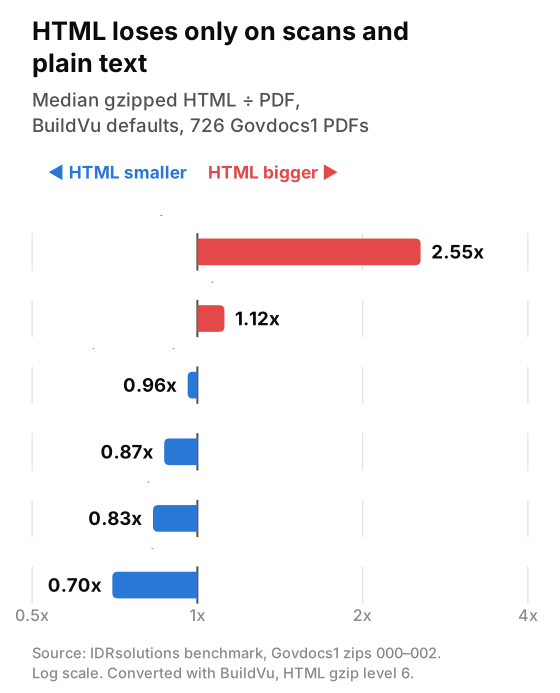
| Content | Files | Gzipped HTML ÷ PDF (median) | With sharper images | BuildVu viewer vs browser’s PDF viewer |
|---|---|---|---|---|
| Text and vector, no images | 298 | 1.12x | 1.13x | 2.87x |
| Text with small images | 224 | 0.96x | 1.19x | 1.66x |
| Mostly JPEG images | 93 | 0.70x | 1.03x | 0.96x |
| Mostly Flate-compressed images | 73 | 0.83x | 1.23x | 1.09x |
| Black-and-white scans (JBIG2, CCITT) | 33 | 2.55x | 7.32x | 3.05x |
| Mostly JPEG2000 | 5 | 0.87x | 1.23x | 1.22x |
HTML came out ahead on everything except scans and plain text, mostly because of the image resizing. Once the images went out at twice the resolution, the PDF won in every category.
Scans did worst. Most black-and-white scans in PDF use JBIG2 or CCITT, two compression formats built for 1-bit pages that no browser can display. The converter has to re-encode each page as an image the browser understands, and the result was over two and a half times the size.
Plain text came out 1.12 times the PDF. A PDF normally compresses its text and drawing instructions inside the file. HTML, CSS and SVG sit on disk as plain text, 2.90 times the size of the PDF, but text gzips well, and gzip closes most of the gap.
Shorter documents did better as HTML. Single-page files had a median of 0.74x; files over 20 pages had 1.06x.
Best and worst cases
Gzipped HTML against PDF, content only. The file names are Govdocs1’s own.
| File | Pages | Gzipped HTML | HTML ÷ PDF | |
|---|---|---|---|---|
| 000344.pdf (one sliced image) | 1 | 2.6MB | 136KB | 0.05x |
| 000269.pdf (JPEG photos) | 2 | 2.1MB | 200KB | 0.10x |
| 000369.pdf (text) | 2 | 12KB | 128KB | 11.1x |
| 001689.pdf (text) | 1 | 7.3KB | 85KB | 11.5x |
| 002935.pdf (text) | 1 | 120KB | 2.3MB | 19.4x |
000344.pdf also turned up in the PNG test: its one page is a picture cut into 872 strips, each one pixel high. Rendering it once, at screen size, is far cheaper than storing it the way the PDF does.
The worst cases are all text-only files. Fonts hit short ones hardest. 000663.pdf names Arial and Times New Roman but doesn’t embed them, which PDF allows: the reader’s PDF viewer substitutes a matching font. A web page can’t rely on that, so BuildVu ships a font file for each, about 25KB apiece, for a one-page PDF of 7.8KB. Its gzipped HTML came out nearly 10 times the size.
What does a viewer cost?
Every option needs something to display the document:
| Viewer | Extra download, gzipped | Cached across documents? |
|---|---|---|
| The browser’s built-in PDF viewer | None | n/a |
| PDF.js 6.3, core and worker only | 506KB | Yes |
| PDF.js 6.3, with its viewer component | 604KB | Yes |
| BuildVu’s viewer (median per document) | 119KB | No |
The browser’s own PDF viewer costs nothing to download, but you can’t style it or put it inside your page. That’s the comparison behind the 1.89x figure above.
If you want the document inside your own page, the like-for-like comparison is PDF.js, the JavaScript library most sites use to show PDFs. It’s much bigger, but a reader downloads it once. BuildVu writes its viewer code into each document’s index.html, so the reader pays it again for every document. BuildVu’s viewer is lighter until a reader opens four or five documents; after that, PDF.js is. PDF.js also builds thumbnails and search in the browser, where BuildVu generates them in advance.
If you’re publishing many documents on your own site, BuildVu’s content-only output inside your own page template avoids paying for a viewer at all.
One HTML file per document, or one per page?
BuildVu writes one HTML file per PDF page by default. Its single-file mode puts the whole document into one index.html instead, with each page’s graphics and images embedded in the HTML. A single file is easier to process and archive. One file per page is faster to display, because the browser only needs the first page before it can show something.
| Pages in the PDF | Files | Single file, gzipped (median) | First page of per-page output, gzipped (median) |
|---|---|---|---|
| 1 | 69 | 80KB | 81KB |
| 2–5 | 183 | 114KB | 90KB |
| 6–20 | 252 | 155KB | 93KB |
| More than 20 | 222 | 490KB | 141KB |
For a one-page document it makes no difference. Beyond 20 pages, a reader of the single file downloads a median of three times as much before seeing anything, and the gap keeps growing with length.
In total, though, the gzipped single file is smaller: a median of 0.90 times the per-page output, and smaller for 684 of the 726 documents. Gzip compresses each file separately, so repeated markup across 50 page files gets compressed 50 times; in one file it’s compressed once. The extreme case is 000674.pdf, 1,000 pages of repetitive text: 2.27MB gzipped as separate pages, 160KB as one file. Uncompressed, it’s the other way round: the single file was a median 1.15 times the per-page output.
Our rule of thumb: one file for short documents and anything you’ll process or archive, one file per page for long documents people read on screen.
Is HTML a good alternative to PDF?
For file size alone, PDF vs HTML has no clear winner: once the HTML was gzipped, the median document was within 1% either way, and the result depends far more on what’s in the file than on the format.
The case for HTML is everything else: the page opens in the browser as part of your site, without a PDF viewer, and its text is ordinary HTML that search engines index like the rest of your pages. We covered that in why PDFs slow down websites.
Keep the PDF when you need one file that prints exactly as designed, and for scans, which were less than half the size as PDF. If you’re choosing between PDF and page images instead, our PDF vs PNG test found the PDF was usually several times smaller.
How we converted PDF to HTML in Java
These are the three BuildVu conversions behind the results above, each with default settings apart from the one noted. Each writes a folder named after the PDF inside the output directory.
import org.jpedal.examples.html.PDFtoHTML5Converter;
import org.jpedal.render.output.ContentOptions;
import org.jpedal.render.output.SinglefileOptions;
import org.jpedal.render.output.html.HTMLConversionOptions;

import java.io.File;

public class PdfToHtml {
    public static void main(String[] args) throws Exception {
        File pdf = new File(args[0]);

        // One HTML file per page, content only (no viewer)
        new PDFtoHTML5Converter(pdf, new File("per-page"),
                new HTMLConversionOptions(), new ContentOptions()).convert();

        // The whole document in a single index.html
        new PDFtoHTML5Converter(pdf, new File("single-file"),
                new HTMLConversionOptions(), new SinglefileOptions()).convert();

        // Sharper images for zooming (default imageScale is 1)
        HTMLConversionOptions sharper = new HTMLConversionOptions();
        sharper.setImageScale(2f);
        new PDFtoHTML5Converter(pdf, new File("sharper"),
                sharper, new ContentOptions()).convert();
    }
}
For the full viewer, pass new IDRViewerOptions() instead of ContentOptions.
You can run this with the free BuildVu trial. Trial output is watermarked, so your sizes will differ slightly from ours.
FAQ
Is HTML smaller than PDF?
About the same, once the HTML is gzipped the way web servers send it. Across 726 government PDFs converted with BuildVu, the gzipped HTML for the median file was 0.99 times the size of the PDF. HTML was smaller for 367 of the 726 files.
Why is the HTML version of a scanned PDF bigger?
Browsers can’t display the JBIG2 and CCITT images most black-and-white scans use, so the converter has to re-encode every page as an image format the browser understands. Our 33 scanned PDFs came out a median 2.55 times bigger as gzipped HTML.
Should I use one HTML file per document or one per page?
One file per page displays faster on long documents: beyond 20 pages, the first page needed a median of 141KB gzipped against 490KB for a single file. A single file is smaller in total, a median of 0.90 times the per-page output, and easier to store and process.
Does a document viewer add much to the size?
It depends on the viewer. The browser’s built-in PDF viewer adds nothing. PDF.js, the most common JavaScript PDF viewer, is 506KB gzipped for its core and worker, downloaded once and cached. BuildVu’s viewer added a median of 119KB gzipped to each document.