
TL;DR PDF is smaller. Across 726 PDFs from the public Govdocs1 corpus, saving every page as PNG made the median file 5.7 times bigger at 72dpi, 16 times bigger at 150dpi and 40 times bigger at 300dpi. Greyscale PNG, 8-bit PNG and JPEG are smaller, but still several times the PDF. Putting a JPEG or PNG into a PDF, with the image data copied across unchanged, added under a kilobyte: a median of 941 bytes for JPEG and 930 bytes for PNG.
We wanted to find out whether one format was always smaller, and whether it mattered what the original documents were. So we looked at a variety of files from public sources and have crunched the numbers for you below.
Contents:
Key results
| 726 Govdocs1 PDFs saved as PNG | 72dpi | 150dpi | 300dpi |
|---|---|---|---|
| Median PNG size ÷ PDF size | 5.7x | 16.2x | 40.3x |
| Mean PNG size ÷ PDF size | 10.7x | 28.0x | 66.9x |
| Files where PNG was smaller | 58 of 726 | 13 of 726 | 1 of 726 |
| Total size (PDFs: 476MB) | 2.36GB | 6.44GB | 16.4GB |
The mean runs well above the median because some text-only files grew up to 84 times over, even at 72dpi. 72dpi is 100% scale, one pixel per PDF point, which looks soft on most current screens, so a PNG that’s smaller at 72dpi may simply have lost detail the PDF kept.
These figures use JDeli’s default full-colour PNG. Saving each page as the smallest lossless PNG, greyscale or palette where the page allows, brings the median down to 4.3x at 72dpi and 11.9x at 150dpi, as the comparison further down shows.
How we tested
The files come from Govdocs1, a corpus of real documents crawled from US government web servers, which Digital Corpora describes as freely redistributable to the best of its knowledge. We used every PDF in its first three folders (zips 000 to 002), the images in its first folder, and a set of public-domain PNGs:
- 726 PDFs, 19,444 pages. 298 are text and vector only, 224 are text with small images, 93 are mostly JPEG images, 73 mostly Flate-compressed images, 33 bilevel scans (JBIG2 or CCITT) and 5 mostly JPEG2000. We classed a file as image-heavy when its image data was more than half its size.
- 112 Govdocs1 images from zip 000: 89 JPEG and 23 GIF. We left out the folder’s one PNG, 000523.png.
- 651 PNGs from public-domain and CC0 test sets: 358 web screenshots, 126 plots, 44 NOAA and 25 EPA document pages and 39 patent scans from imazen-26, 25 photos and 10 screenshots from GB82, and the 24 Kodak test photos.
For PDF to PNG, we used our JPedal PDF library to render every page, and our JDeli image library to save each page as PNG with its default lossless setting (maximum Deflate compression). We compared the total PNG bytes with the original PDF, at 72, 150 and 300dpi. The main results use JDeli’s default full-colour PNG; the section after next compares greyscale, palette and 8-bit PNG and JPEG on the same page images.
For image to PDF, we compared each original image with the same image re-saved as PNG, and with a one-page PDF containing it. JPEGs went into the PDF with their original bytes unchanged. PNGs went in with their compressed image data copied unchanged, which PDF supports because both formats use the same Deflate compression and row filters. The 26 PNGs with a transparency channel, and all GIFs, were stored lossless instead. We rendered each of the 625 copied PNGs back out of its PDF, and every one matched the original pixel for pixel.
The per-file results are available to download: PDF to PNG (726 PDFs) and image to PDF (763 images), both as CSV.
PDF vs PNG file size by content type
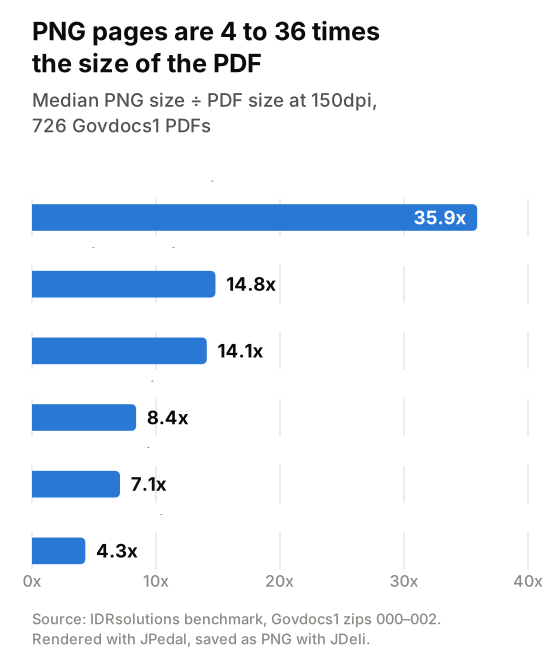
Text-only PDFs grew the most as PNG: 13 times over even at 72dpi. Image-heavy PDFs and scans grew the least, 2 to 3 times at 72dpi.
| Content | Files | Median at 72dpi | Median at 150dpi | Median at 300dpi |
|---|---|---|---|---|
| Text and vector, no images | 298 | 13.4x | 35.9x | 83.5x |
| Text with small images | 224 | 5.6x | 14.8x | 37.2x |
| Mostly JPEG images | 93 | 2.7x | 8.4x | 22.6x |
| Mostly Flate-compressed images | 73 | 2.4x | 7.1x | 19.3x |
| Mostly bilevel scans (JBIG2, CCITT) | 33 | 2.9x | 4.3x | 16.5x |
| Mostly JPEG2000 | 5 | 4.6x | 14.1x | 39.5x |
Single-page files grew the least: a median of 4.7x at 150dpi, against 14.0x for 2 to 5 pages and 19.8x to 21.1x above that.
What about greyscale PNG, 8-bit PNG or JPEG?
Default PNG isn’t the smallest way to save a page, so we saved every rendered page five more ways and compared them with the same PDF.
| Page saved as | Median at 72dpi | Median at 150dpi | Smaller than the PDF at 150dpi |
|---|---|---|---|
| PNG, default (full colour, lossless) | 5.7x | 16.2x | 13 of 726 |
| Best lossless PNG (greyscale or palette where the page allows) | 4.3x | 11.9x | 23 of 726 |
| 8-bit PNG (lossy) | 3.0x | 8.3x | 45 of 726 |
| JPEG, quality 75 | 3.6x | 11.5x | 35 of 726 |
| JPEG, quality 90 | 5.6x | 18.1x | 16 of 726 |
Greyscale helps most on text pages, which are usually black on white. 8-bit PNG and JPEG close more of the gap, but they throw detail away, and JPEG leaves artefacts around text. Even the smallest option was 8.3 times the PDF at 150dpi. At 300dpi, on the 200 files in zip 000, it was 19 times.
The lossy formats come closest on image-heavy PDFs. At 150dpi, JPEG pages were 4.0 times the PDF for files that are mostly JPEG images, and the best lossless PNG was 2.9 times for scans.
How each format saves space
Inside a PDF, text is stored as character codes and positions, usually Flate-compressed, and each font is stored once for the whole document. Images keep the codec that suits them: JPEG for photos, JBIG2 or CCITT for black-and-white scans, JPEG2000 or Flate for the rest.
PNG has only pixels. It predicts each one from its neighbours and compresses what’s left with Deflate, losing nothing. That suits flat colour, but every glyph on every page turns into antialiased pixels, and lossless compression can’t get near JPEG on photos.
The PDF Association has added Brotli to PDF 2.0 as an optional alternative to Flate, published as an extension in 2026 and expected in the ISO standard later. It generally compresses fonts and page content better still, though few PDF readers support it yet. Our results use Flate throughout.
What if the file starts as an image?
Every file in the tests above started as a PDF, so we also ran it the other way round with all 763 images. Putting an image into a PDF costs almost nothing, as long as the image goes in unchanged.
| Original image | Files | Re-saved as PNG (median) | Wrapped in a PDF (median) |
|---|---|---|---|
| JPEG | 89 | 5.02x | 1.03x, +941 bytes |
| PNG | 651 | 1.02x | 1.00x, +930 bytes |
A PDF can hold a JPEG’s original bytes, or a PNG’s compressed image data, so the only addition is the page and file structure around it. For PNG, the median for every kind of content we tried was between 1.00x and 1.02x the original: screenshots, plots, document pages, scans and photos.
We’ve left the 23 GIFs out of the table. In this test they went into the PDF as full-colour lossless images rather than keeping their original palette, so the comparison wouldn’t be like for like.
Best and worst cases
All at 72dpi. The file names are Govdocs1’s own, so anyone can check them.
| File | Pages | PNG | PNG ÷ PDF | |
|---|---|---|---|---|
| 001071.pdf (text) | 357 | 500KB | 41.9MB | 83.8x |
| 000591.pdf (text) | 4 | 6KB | 443KB | 69.8x |
| 001386.pdf (text) | 117 | 164KB | 9.7MB | 58.7x |
| 000357.pdf (JPEG photos) | 2 | 477KB | 79KB | 0.17x |
| 000344.pdf (one sliced image) | 1 | 2.6MB | 247KB | 0.09x |
The worst cases for PNG are text documents, long or short. 000591.pdf holds four pages of text in 6KB; as PNG, the same pages take 443KB.
The best cases are PDFs carrying far more image data than a 72dpi page can show. 000357.pdf holds two 1599×2120 JPEG photos, which shrink a lot when rendered at 72dpi. 000344.pdf is stranger: its one page is a picture cut into 872 strips, each one pixel high and about 2,300 pixels wide, stored lossless. Rendering it flattens all that into one ordinary image.
Is PDF or PNG better for printing?
Print usually needs 300dpi, which is where PNG does worst: it was smaller for just 1 of the 726 files, and text-only documents grew 84 times over.
A PNG is also fixed at the resolution it was saved at, while text and vector graphics in a PDF print sharp at whatever resolution the printer uses.
PNG vs PDF: which should you use?
Keep documents as PDF. PNG was bigger for 668 of the 726 files even at 72dpi, and nobody can search a PNG page or select its text.
PNG is the better choice when you want a picture of a page rather than the document, such as a thumbnail or a single page you can send without the whole file. A PNG also drops straight into an img tag, an email or a chat message, where a PDF can’t be shown inline. If the aim is to stop people copying text, OCR gets it back in seconds. If your file starts as an image, check that your PDF tool embeds the JPEG or PNG data unchanged rather than re-encoding it.
If you’re publishing documents on the web, we also compared HTML vs PDF file size on the same 726 files.
How we converted PDF to PNG in Java
The core of the test is a few lines of Java: JPedal renders each page and JDeli writes it as PNG. Run on 000591.pdf at 150dpi, it prints PDF 6,349 bytes, PNG 1,133,725 bytes (178.6x), the same figure our benchmark recorded for that file.
import com.idrsolutions.image.JDeli;
import org.jpedal.PdfDecoderServer;

import java.awt.image.BufferedImage;
import java.io.File;

public class PdfToPngSize {
    public static void main(String[] args) throws Exception {
        File pdf = new File(args[0]);
        float scale = 150 / 72f; // 1.0 = 72dpi

        PdfDecoderServer decoder = new PdfDecoderServer();
        decoder.openPdfFile(pdf.getAbsolutePath());
        long pngBytes = 0;
        for (int page = 1; page <= decoder.getPageCount(); page++) {
            BufferedImage image = decoder.getPageAsImage(page, scale);
            File png = new File("page-" + page + ".png");
            JDeli.write(image, "png", png);
            pngBytes += png.length();
        }
        decoder.closePdfFile();

        System.out.printf("PDF %,d bytes, PNG %,d bytes (%.1fx)%n",
                pdf.length(), pngBytes, (double) pngBytes / pdf.length());
    }
}
You can run this with the free JPedal trial and JDeli trial. Trial output is watermarked, so your PNG sizes will be a little larger than ours.
For the other formats, pass JDeli a PngEncoderOptions with setOptimizeBasedOnColors(true) (palette) or setCompressionFormat(PngCompressionFormat.QUANTISED8BIT) (8-bit), or write "jpeg" instead of "png".
FAQ
Is a PDF smaller than a PNG?
For the 726 government PDFs we tested, yes. The PNG version of the median file was 5.7 times bigger at 72dpi and 16 times bigger at 150dpi.
Does converting a JPEG or PNG to PDF make it bigger?
Barely, if the tool embeds the image data unchanged: the median PDF was 941 bytes bigger than the JPEG and 930 bytes bigger than the PNG. A tool that re-encodes a JPEG’s pixels losslessly can make it about five times bigger.
Does resolution change the answer?
Yes. Doubling the resolution quadruples the pixels, so the PNG grows while the PDF stays the same. The median ratio went from 5.7x at 72dpi to 40x at 300dpi.
Is JPEG smaller than PNG for saving PDF pages?
Usually, but not by enough to beat the PDF. At 150dpi, JPEG at quality 75 was 11.5 times the PDF for the median file, against 16.2 times for PNG, and it leaves artefacts around text. Lossless greyscale or palette PNG, where the page allows it, did about as well at 11.9 times with no loss.