
If you’re reading this as a developer, there’s a good chance you’ve just lost a lot of time trying to get a standard PDF library to extract data from a government form, only to find that your library thinks the document is empty. Or maybe your client just called, furious that their customers can’t fill out your onboarding form on their iPhones.
Welcome to XFA Hell. You aren’t alone!
XFA (XML Forms Architecture) is a proprietary XML-based template format developed by JetForm for creating interactive and dynamic PDF forms. You can read more about XFA forms here.
Across the internet, developers are struggling to create workarounds for XFA’s problem. Take this reddit post from weary developer struggling with German government XFA forms titled:
“Burned Through Thousands of AI Tokens and Still Can’t Beat This German Government PDF”
These aren’t just minor compatibility bugs. They are symptoms of a deprecated, proprietary and inherently non-web-friendly document architecture. With business implications, these forms become technical debt and are a pain for developers!
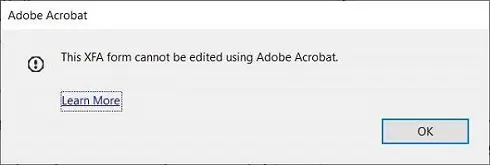
Users also have trouble displaying XFA forms on iOS and Android devices as stated in this Adobe Experience Experience guide. More often, people will see this dreaded error pop up on Acrobat:
In this post, we’ll look at why XFA is fundamentally broken for the modern web and why converting these forms to HTML with FormVu isn’t just a workaround, it’s the definitive solution.
Why XFA forms Fail Developers
XFA was was added to the PDF 1.5 spec, to handle dynamic, complex forms that traditional PDF (AcroForms) couldn’t. Think forms that add rows automatically, change entire sections based on user input or calculate complex formulas on the fly.
It accomplished this by embedding a complete XML-based form specification inside the PDF wrapper. While useful for its time, this architecture creates several critical, unsolvable problems for modern developers:
Zero Mobile or Native Browser Support
Modern web browsers (Chrome, Firefox, Safari) have built-in PDF viewers. Because XFA is proprietary and immensely complex, most popular browsers do not support it by default. Trying to display on Mobile devices is even worse.
If your users try to open an XFA form, they’ll see a static one-page PDF with a message telling them to download Adobe Reader. In an era of mobile-first development, XFA forms are a dead end.
Deprecated by the ISO Standard
When PDF became an open standard (ISO 32000), XFA was included for compatibility. However, realizing its proprietary limitations, the ISO officially deprecated XFA in the PDF 2.0 standard.
If you are developing new workflows around XFA, you are investing in a technology that has already been declared dead by the custodians of the PDF format.
The Solution: Convert XFA Forms to HTML5
You don’t need another niche PDF library. You need to bridge the gap between 20-year-old proprietary tech and the modern web. The answer is HTML.
By converting your PDF forms to HTML, you will not only make your forms web-friendly and mobile-friendly, but have more granular control over the content.
How FormVu Turns XFA into Native Web Experience
FormVu is not a generic PDF to HTML converter. It is a specialised SDK designed by developers, specifically to handle the complexities of fillable PDF forms.
Here is how FormVu solves the specific problems that are costing you development time:
- In addition to desktop, converted forms work seamlessly across all mobile devices. Using HTML, CSS and JavaScript, the forms can also be filled out offline.
- FormVu provides powerful APIs across multiple languages (Java, command line, cloud-based). It fits into your existing workflow rather than forcing you to adopt an entire Adobe ecosystem (like AEM or LiveCycle).
- FormVu offers self-hosted options, allowing you to convert and host the files on your own secure servers.
Stop Patching Legacy Tech: Ship Native HTML5 with FormVu
If you are a developer, your job is to build efficient, scalable, and user-friendly systems. XFA is an obstacle to all three of those goals.
You can continue to struggle with standard PDF libraries to understand proprietary XML, or you can use FormVu to convert them into HTML so you have greater control over your forms.
If you’re unsure, you can run test conversions using our free online PDF form to HTML converter, it uses the same tech as our API!
FAQs
Q: How do I programmatically detect an XFA form?
A: Check your PDF’s /AcroForm dictionary. If it contains an /XFA key pointing to a data stream, it’s an XFA form. Standard PDF forms only use the /Fields array.
Q: What’s the difference between Static and Dynamic XFA?
A: Static XFA forms have a fixed, unchanging layout. Dynamic XFA forms re-render on the fly, adding rows, hiding sections, and flowing across pages based on user input.
Q: Does XFA use standard JavaScript?
A: It supports standard JS, but heavily relies on FormCalc, Adobe’s proprietary scripting language. To migrate successfully, you need a tool that translates FormCalc logic into standard web JavaScript so your calculations don’t break.
Q: Can I just “flatten” an XFA form to fix compatibility?
A: Usually, no. Standard PDFs flatten easily, but attempting to programmatically flatten a dynamic XFA form often breaks the layout entirely or results in a blank page.
FormVu allows you to
| Use Interactive PDF Forms in the Web Browser |
| Integrate fillable PDF Forms into Web Apps |
| Parse PDF forms as HTML5 |
What is FormVu?
FormVu is a commercial SDK for converting PDF Form files into standalone HTML with interactive form components.
Why use FormVu?
FormVu allows you to integrate PDF forms into your web application effortlessly while retaining all their interaction and functionality.
What licenses are available?
We have 3 licenses available:
Cloud for form conversion using the shared IDRsolutions cloud server, Self hosted server option for your own cloud or on-premise servers, and Enterprise for more demanding requirements.
How to use FormVu?
Want to learn more about FormVu and how to use it, we have plenty of tutorials and guides to help you.
